

 Back
Back


 Back to
topics
Back to
topics



Table of Contents

 24-Jul-2025
Author-Gary Moore
Imagine your team is building a new mobile app. The designers are working on screens, the developers are writing code, and the testers are checking for bugs. Everyone is busy, but no one knows what others are doing. Tasks get missed, deadlines slip, and confusion grows. This happens in many IT projects. That’s why smart teams use a Scrum Board.
A Scrum Board helps teams see what to do, what’s in progress, and what’s done. It keeps projects clear and on track. In this blog, you’ll learn what a Scrum Board is, how it works, its types, benefits, usage tips, and a real example.
Table of Contents
1) What is a Scrum Board?
2) Key Components of a Scrum Board
3) Types of Scrum Boards
5) Benefits of Scrum Boards
6) Five Tips to Get the Most out of Your Scrum Board
7) Example of a Scrum Board
8) Conclusion
What is a Scrum Board?
A Scrum Board is a simple tool that helps teams manage their work. Teams use it when they work in short time periods called sprints. A sprint usually lasts 1 to 4 weeks. The Scrum Board shows all the tasks the team wants to finish during the sprint. It helps the team know what to do, what is being done, and what has already been done. It also helps the team talk clearly and stay organised.
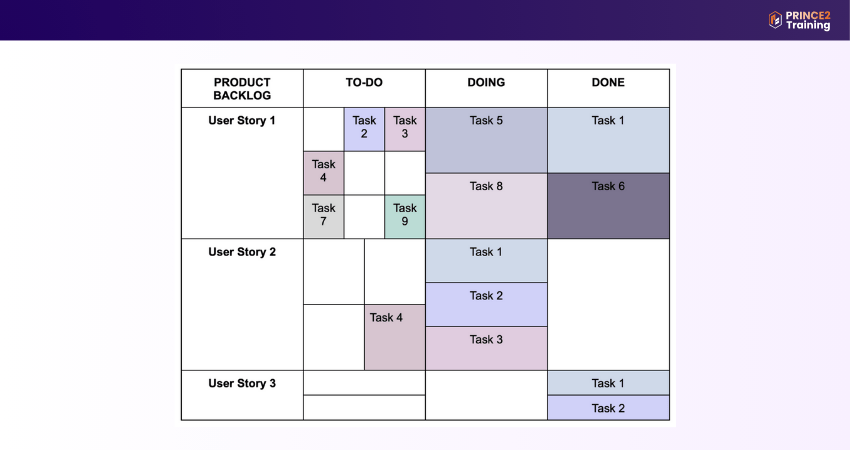
The board has columns to show the steps of the work. The main columns are: To Do (not started), In Progress (being done), and Done (finished). Each task is shown as a card on the board. As the team works, they move the cards from one column to the next. Tasks not picked for the sprint are kept in a list called the Scrum Backlog. The Scrum Board helps everyone understand the work in a simple and easy way.

Key Components of a Scrum Board
To use a Scrum Board well, you need to understand its key parts.
1) Scrum Artefacts
Scrum has three main parts called artefacts. These help the team know what to do, what is being done, and what is finished. They make work clear and easy to follow.
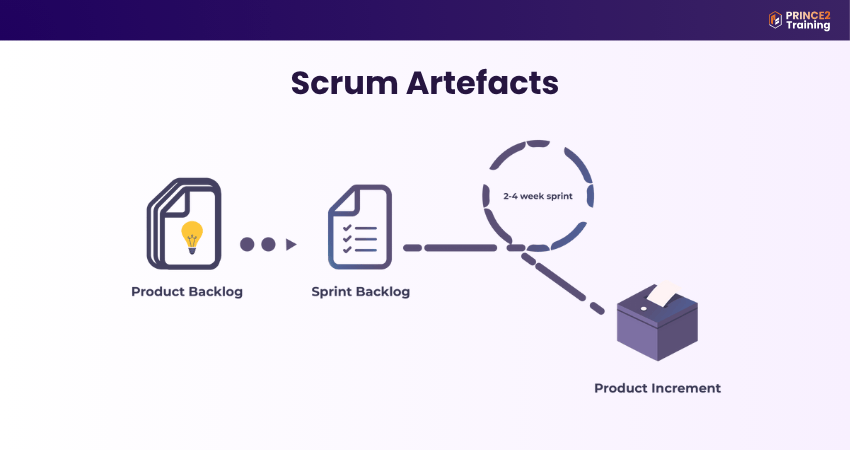
Product Backlog:
1) A full list of all features, fixes, and requirements for the product
2) Managed by the Product Owner
3) Continuously updated as needs change
4) Supports long-term planning and prioritisation
Sprint Backlog:
1) A smaller list created from the Product Backlog
2) Contains only tasks chosen for the current sprint
3) Includes a Sprint Goal, the plan, and the selected items
4) Updated daily by the team
Increment:
1) The usable product output created during the sprint
2) Must meet the Definition of Done (DoD)
3) Represents progress toward the Product Goal
4) Reviewed in the Sprint Review
2) Scrum Team
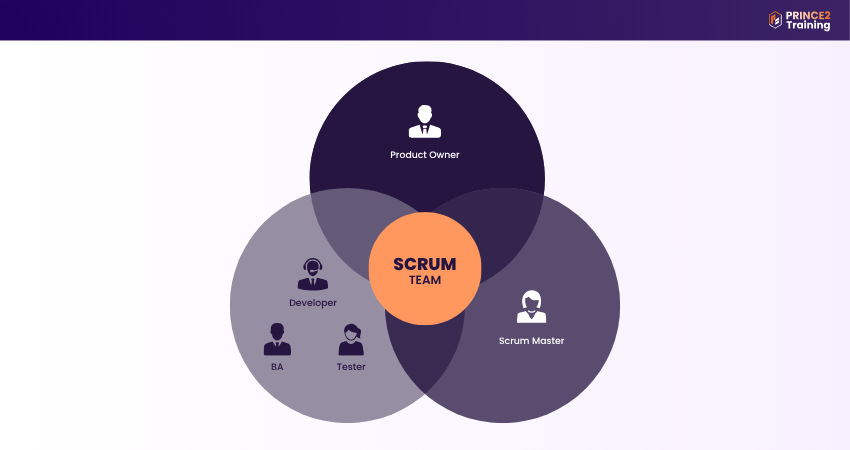
Scrum teams are small and work closely together. They should have all the skills needed to finish the work in each sprint. Each person in the team has a different job that helps the team succeed.
1) Product Owner
The Product Owner speaks for the customers or users. They help the team work on the most important tasks. They write user stories, choose which tasks to do first, and make sure everyone understands what needs to be done. They help guide the product in the right direction.
2) Scrum Master
The Scrum Master helps the team follow Scrum rules. They teach the team how Scrum works, help run meetings, and fix any problems that stop the team from working well. They support the team and make sure work goes smoothly.
3) Development Team
The Development Team does the actual work. They take tasks from the backlog and build the product step by step. They work together, share ideas, and help each other. The team should be strong, skilled, and able to manage their work without needing someone to tell them what to do all the time.
Accelerate your Agile journey with our
Scrum Developer Training
and build expert-level skills
Types of Scrum Boards
Scrum Boards can be physical or online, and both are useful in different ways.
1) Physical Scrum Board
A Physical Scrum Board is something you can touch, like a whiteboard or a wall with sticky notes. It helps teams see their tasks clearly. Here are six simple points about it:
1) Easy to Make:
You can make it using a whiteboard or corkboard and sticky notes. It doesn’t need a computer.
2) Simple to Change:
You can move tasks around or redesign the board after each sprint as needed.
3) Good Visual Reminder:
It stays in front of the team and reminds them of their work all the time.
4) Great for Team Meetings:
Teams can stand around the board during daily meetings and talk about the tasks.
5) Fun to Personalise:
Teams can decorate it, colour-code tasks, or design it to match their project theme.
6) Only Works for Local Teams:
Everyone needs to be in the same room to see and use the board.
2) Online Scrum Board
An Online Scrum Board is a digital board used on a computer or phone. It helps teams that work in different places. Here are six simple points about it:
1) Made with Digital Cards:
Tasks are added as online cards that can be moved between columns easily.
2) Easy to Update:
Team members can sort, filter, and update tasks anytime using online tools.
3) Creates Reports Automatically:
At the end of each sprint, the tool can create reports to show team progress.
4) Shows Updates in Real-time:
Everyone sees changes as soon as they happen—no need to refresh or ask others.
5) Saves Work for Later:
Old sprint data can be stored and used again in future planning.
6) Great for Remote Teams:
Team members in different places can see and use the board at the same time.
How to use Scrum Task Boards?
To get the most help from a Scrum Board, teams should know how to use it step by step. This makes it easier to manage tasks and finish projects without problems. Here’s a simple guide:
1) Define User Stories
First, the team thinks about what the user needs. These are called user stories. The team makes a list called the Product Backlog. Then they choose what to work on now and put those in the Sprint Backlog.
2) Assign Tasks
Each user story is broken into smaller, simple tasks. The team puts all these tasks into the To Do column on the Scrum Board. After that, each team member chooses a task to begin working on. This helps everyone know what they are doing and keeps the work organised.
3) Execute Project Tasks
When work begins, the team moves each task from To Do to In Progress. Every day, the team meets to talk about what they are working on and what help they need. The Scrum Master supports the team and helps fix any problems that slow the work.
4) Finish all Tasks
When someone finishes a task, they move it to the Done column. Then they pick a new task from the To Do column and start working on it. The goal is to move all tasks to Done before the sprint ends.
5) Conduct Sprint Reviews
At the end of the sprint, the team and Scrum Master have a Sprint Review meeting. They talk about what was done well, what was not finished, and what can be improved. This meeting helps the team learn and work better in the next sprint.
Master Product Management skills. Register for our
Scrum Product Owner Certification
now.
Benefits of Scrum Boards
Scrum Boards help teams work better and faster. No matter how big or small the team is, these boards make the work easier to manage. Here are some of the main benefits:

1) Enhanced Team Collaboration and Communication
A Scrum Board displays all team tasks in one central place. Everyone can see what needs doing, what’s in progress, and what’s finished. This keeps communication clear and team members aligned.
Example:
In a daily stand-up, the developer sees that the tester is waiting for a login feature. The Scrum Board shows it's still “In Progress,” so they quickly discuss it and adjust the plan to stay on track.
2) Increases Workflow Transparency
Scrum Boards give everyone a clear view of task progress. You can easily spot what’s pending, in progress, or complete. This clarity ensures accountability and reduces the chances of missed work.
Example:
A Project Manager sees that most tasks are still in “To Do.” Realising the sprint is behind, they call a quick meeting to fix the delay.
3) Improves Task Organisation and Prioritisation
Scrum Boards help teams break large items into smaller tasks and assign them clearly. Teams can also highlight high-priority work to focus efforts effectively.
Example:
Before the sprint, the team finds a high-priority security task and moves it to “To Do” to handle it first.
4) Quick Identification of Bottlenecks and Blockers
Scrum Boards make delays easy to spot. If a task stays in one column too long, the team can act quickly to fix the issue.
Example:
A task is stuck in “In Progress.” The team learns that the developer needs Application Programming Interface (API) access. The Scrum Master fixes it so work can continue.
5) Flexibility and Adaptability in Agile Projects
Scrum Boards allow real-time updates. Teams can adjust to changes, add new tasks, or reorder priorities without disrupting the workflow.
Example:
Mid-sprint, a client asks for a new feature. The team updates the board and moves a lower task to the next sprint.
Five Tips to Get the Most out of Your Scrum Board
A Scrum Board is a great tool, but only if you use it the right way. Just having the board is not enough. To really get the best out of it, teams need to follow some easy steps. Here are five simple tips:

1) Hold Effective Scrum Ceremonies
1) Start the day with a short meeting (daily Scrum)
2) Each team member answers three simple questions:
a) What did I do yesterday?
b) What will I do today?
c) Is anything stopping me?
3) These meetings help the team talk clearly and keep the Scrum Board up to date
2) Create Detailed Tasks
1) Break big user stories into small, simple tasks
2) Each task should take one day or less to finish
3) Talk with the Product Owner to understand what needs to be done
4) Plan and write tasks during the sprint planning meeting
5) Clear tasks help the team work faster and with fewer mistakes
3) Assign Resources Effectively
1) The Scrum Master helps the team work better
2) Assign the right task to the right person
3) Make sure all tools and resources are ready
4) Plan everything early so work goes smoothly
5) Good planning means the sprint runs without problems
4) Maintain Visibility of All Tasks
1) Add all tasks to the Scrum Board, so nothing should be missed
2) Everyone should see who is doing what and what is left to do
3) Show which tasks are in progress, blocked, or done
4) Let team members, managers, and clients check the board easily
5) A full and clear board builds trust and avoids confusion
5) Limit Items in Each Column
1) Avoid putting too many tasks in the "In Progress" column
2) Only move tasks if someone is ready to work on them
3) Too many tasks can confuse and slow down the team
4) Keep a balance so the team can focus well
5) A clean board helps the teamwork without delays
Example of a Scrum Board
Using a digital Scrum Board is easier than using a board on the wall. It is simple to use and works well, even if your team is working with other teams that do not follow Agile. You can open the board from anywhere, at any time. Since it is online, it updates right away. This helps everyone see the same information and work together without confusion.
Example:
Your team is making a mobile app. The board has three columns:
1) To Do:
Design login, write welcome message
2) In Progress:
Set up menu
3) Done: App logo, project folder
As team members work, they move tasks across the board. Everyone can see updates right away, even from different places. This keeps the team clear and organised.
Conclusion
A Scrum Board helps teams stay organised, manage tasks easily, and work better together every day. Whether it's physical or digital, it shows the team’s progress clearly. By using it the right way, teams can spot problems early and stay on track. Overall, a task board is a simple but powerful tool in any Agile project.
Begin your journey to becoming a Scrum expert with our Scrum Master Certification now!
Frequently Asked Questions?
A Scrum Board works by showing tasks that need to be done, tasks in progress, and tasks that are finished. Team members move tasks across the board as work gets done. This makes the work easy to track and manage.
Scrum and Agile are not the same. Agile is the bigger idea or method of working in short cycles. Scrum is one way to do Agile. So, it's not about one being better, Scrum is part of Agile.
The 5 P’s of meetings are:
1) Purpose: Why are we meeting?
2) Product: What do we want as the result?
3) People: Who needs to be there?
4) Process: How will we run the meeting?
5) Preparation: What do we need to do before the meeting?