

 Back
Back


 Back to
topics
Back to
topics



Table of Contents
 11-Jul-2026
Author-Gary Moore
Managing project documents can become challenging when files are scattered across emails, cloud storage, and multiple team members. A missing report, an outdated spreadsheet, or a lost approval can slow progress and create unnecessary confusion. This is why Project Document Management is important for keeping project information organised, accurate, and easy to access at every stage.
From planning to final delivery, projects create many important documents that require proper organisation and regular updates. These documents help teams improve coordination and maintain better control over project records. In this blog, we will explore what is Project Document Management, its types, features, benefits, and more. Let’s begin!
What is Project Document Management?
Project Document Management is the process of creating, organising, sharing, storing, and monitoring project-related documents throughout the entire project lifecycle. It ensures that important project information remains accurate, accessible, and well-structured for all stakeholders involved in the project.
Project documents, such as project plans, risk registers, status reports, and approval records, help teams track progress, manage risks, and make informed decisions. Also, effective Project Document Management improves collaboration, reporting, and overall project control.

Types of Project Management Documents
Project Management Documents are created at different stages of a project to organise information, track progress, manage risks, and support decision-making. Let’s look at its types below:
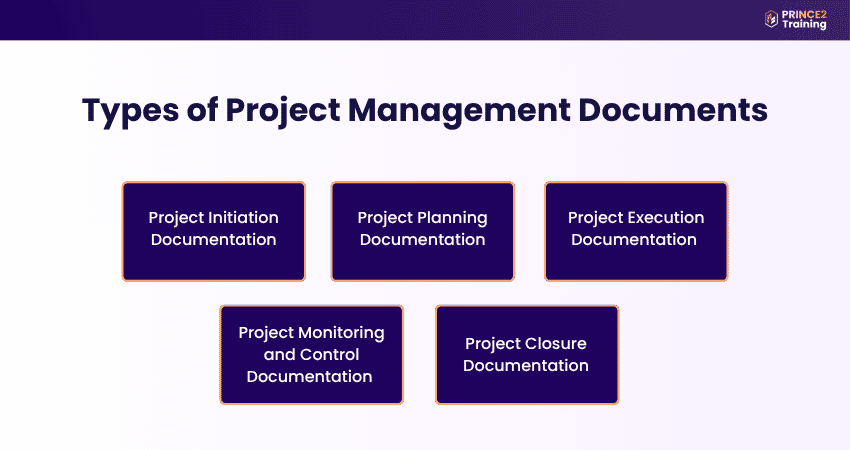
1) Project Initiation Documentation
Project Initiation Documentation is prepared at the beginning of a project to define its purpose, value, feasibility, and direction. It helps stakeholders understand why the project is needed, what it aims to achieve, and whether it should be approved.
Key documents include:
a) Project Charter: Formally authorises the project and outlines objectives, scope, stakeholders, and responsibilities.
b) Business Case: Explains the need for the project by highlighting expected benefits, costs, risks, and value.
c) Project Brief: Provides an early overview of the project background, goals, requirements, and expected outcomes.
d) Stakeholder Register: Identifies key stakeholders and records their roles, interests, influence, and communication needs.
e) Feasibility Study: Checks whether the project is practical, achievable, and worth continuing.
2) Project Planning Documentation
Project Planning Documentation explains how the project will be delivered, managed, and controlled. It provides a clear roadmap for handling scope, time, cost, quality, resources, risks, and communication.
Key documents include:
a) Project Management Plan: Acts as the main guide for managing and delivering the project successfully.
b) Scope Statement: Defines what is included in the project and what is outside its boundaries.
c) Work Breakdown Structure: Breaks the project into smaller tasks so the team can manage work more easily.
d) Project Schedule: Lists tasks, timelines, milestones, deadlines, and dependencies.
e) Risk Management Plan: Identifies possible risks and explains how they will be monitored and managed.
3) Project Execution Documentation
Project Execution Documentation is used while project work is being carried out. It helps teams assign work, record updates, manage deliverables, and ensure that tasks are completed as planned.
Key documents include:
a) Task Assignments: Clarify who is responsible for specific project activities and deliverables.
b) Meeting Minutes: Record discussions, decisions, action points, responsibilities, and deadlines.
c) Issue Log: Tracks problems that arise during the project and records how they are resolved.
d) Deliverable Records: Document completed outputs and confirm their progress or approval status.
e) Quality Checklists: Help verify whether project work meets the required quality standards.
4) Project Monitoring and Control Documentation
Project Monitoring and Control Documentation is used to track project performance and compare actual progress against the approved plan. It helps project managers identify delays, risks, budget issues, and quality concerns early.
Key documents include:
a) Progress Reports: Show completed work, pending tasks, current status, and upcoming priorities.
b) Performance Reports: Compare actual project performance with planned targets for time, cost, and quality.
c) Risk Register: Tracks identified risks, their likelihood, impact, owners, and response actions.
d) Change Log: Records requested, approved, rejected, or pending changes in the project.
e) Budget Tracking Report: Monitors project spending and compares actual costs with the approved budget.
5) Project Closure Documentation
Project Closure Documentation is prepared when the project is completed or formally ended. It confirms that deliverables have been reviewed, accepted, handed over, and properly recorded.
Key documents include:
a) Project Closure Report: Summarises project performance, achievements, issues, outcomes, and final status.
b) Final Project Report: Provides a complete record of results, deliverables, costs, timelines, and lessons.
c) Lessons Learned Document: Records what worked well, what went wrong, and what can be improved in future projects.
d) Handover Document: Transfers project outputs, responsibilities, and important information to the relevant team or client.
e) Client Acceptance Form: Confirms that the final deliverables have been reviewed and accepted by the client or stakeholders.
Learn the framework behind successful projects by joining the PRINCE2® Foundation Training now!
Features of Project Document Manager
A Project Document Manager includes several features that help teams organise, store, track, and manage project files effectively. Let’s look at the key ones below:
1) Version Management
Version management helps teams manage document updates by ensuring everyone has access to the latest version of a file. It reduces duplication, prevents confusion caused by multiple document versions, and maintains document accuracy.
Also, this feature records changes made to documents, allowing teams to track edits, review document history, and identify who made specific updates. As a result, collaboration becomes more transparent and efficient.
2) Document Storage and Easy Access
Centralised document storage allows teams to store and access project files from a single location. This makes it easier to organise documents, retrieve important information quickly, and maintain structured project records.
Also, many Project Document Management tools support different file types, including Word documents, spreadsheets, Computer-Aided Design (CAD) files, and design models. Features like file sharing, archiving, and desktop access further improve convenience and accessibility.
3) Customisable Workflows
Customisable workflows allow organisations to design project processes based on their specific requirements. Teams can create workflows that match their operations, improving coordination and task management.
Also, workflow automation helps simplify repetitive tasks, maintain consistency, and support smooth project execution. This flexibility enables teams to adapt easily to changing project needs while improving overall efficiency.
Benefits of Project Document Management
Project Document Management helps organisations organise, track, and manage project information efficiently. Let's look at some of its key benefits below:
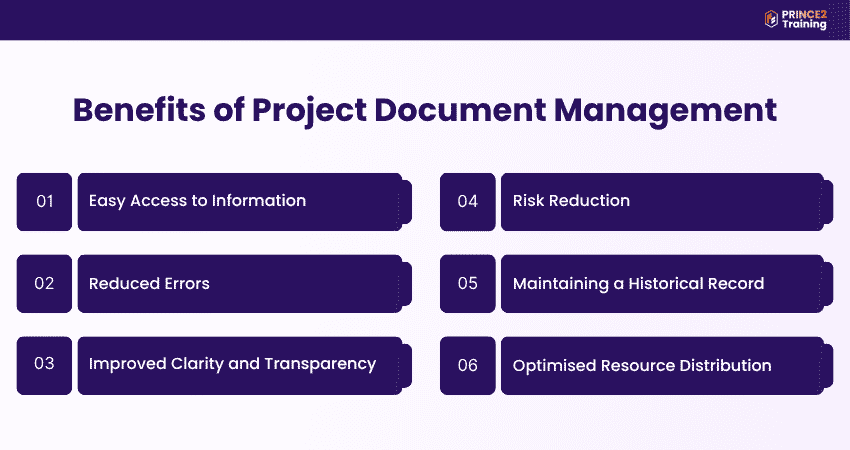
1) Easy Access to Information
Project Document Management stores all project files in a central location, making it easier for teams to quickly find, access, and share important information. This improves productivity and helps teams work more effectively.
2) Reduced Errors
Version control allows teams to track document updates, review previous versions, and identify changes made by team members. This reduces duplication, prevents confusion caused by outdated files, and helps maintain accurate project documentation.
3) Improved Clarity and Transparency
Clear project documentation helps everyone understand project goals, deadlines, responsibilities, and progress. It improves communication, reduces misunderstandings, and supports smoother collaboration throughout the project lifecycle.
4) Risk Reduction
Detailed project records help teams identify potential risks early and prepare suitable mitigation strategies. Also, reviewing previous issues and lessons learned helps organisations avoid repeating mistakes and improves overall project decision-making.
5) Maintaining a Historical Record
Project documents create a complete record of decisions, approvals, milestones, and changes made throughout the project. These records are useful for audits, project reviews, dispute resolution, and future project planning.
6) Optimised Resource Distribution
By maintaining accurate project records, budgets, schedules, and resource reports, Project Document Management provides managers with reliable information for planning and decision-making. This supports better resource allocation, improved budget control, and effective project execution.
Build confidence beyond project basics by signing up for the PRINCE2® Foundation and Practitioner Training today!
Common Challenges in Project Document Management
Project Document Management can be challenging, especially when organisations handle large amounts of information and introduce new systems. Addressing these challenges helps improve document organisation and maintain better project control. Let’s look at the key ones below:
a) Resistance to Change: Employees may hesitate to adopt new Document Management Systems due to changes in existing workflows and processes.
b) Technology Integration Issues: Integrating Project Document Management Systems with existing tools and infrastructure can create compatibility challenges.
c) Maintaining Consistent Documentation: Keeping project documents updated, accurate, and organised can become difficult due to limited time and large amounts of paperwork.
d) Time-consuming Manual Processes: Manual document handling can slow workflows and increase errors, making automation important for improving productivity and document accuracy.
Best Practices for Project Document Management
Following best practices in Project Document Management helps organisations maintain organised records, improve collaboration, and ensure documents remain accurate and accessible. Let’s look at some of the important best practices to follow:
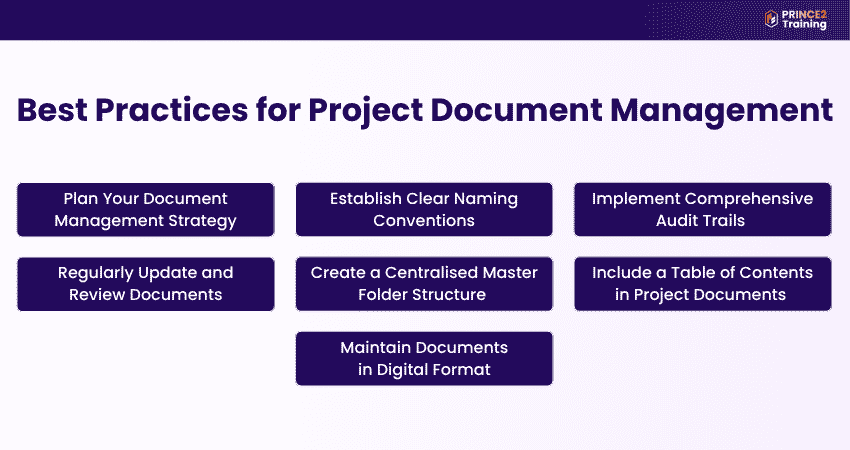
1) Plan Your Document Management Strategy
Creating a clear document management plan helps teams organise, store, share, and track project files effectively. It ensures everyone understands how documents will be managed throughout the project. Also, using Project Document Management software can further improve collaboration and document control.
2) Establish Clear Naming Conventions
Using consistent naming conventions makes documents easier to organise, search, and retrieve. Clear file names help team members quickly identify the correct document, reduce confusion, and maintain a structured document system.
3) Implement Comprehensive Audit Trails
Audit trails help track document activity, including edits, updates, approvals, and user access. This improves transparency and accountability while maintaining a complete history of document changes and contributor actions.
4) Regularly Update and Review Documents
Project documents should be reviewed and updated regularly to ensure information remains accurate, relevant, and aligned with project progress. This helps teams avoid outdated information and supports better project decision-making.
5) Create a Centralised Master Folder Structure
Storing all project documents in a centralised digital repository improves accessibility and keeps files organised in one location. This reduces duplication, prevents misplaced files, and ensures teams work from a single or centralised source of accurate information.
6) Include a Table of Contents in Project Documents
Including a table of contents in detailed project documents improves navigation and readability. It allows stakeholders to quickly locate important sections, especially in lengthy reports, policies, and project governance documents.
7) Maintain Documents in Digital Format
Storing documents in electronic format supports remote access, real-time collaboration, secure backups, and faster document retrieval. Also, digital storage reduces the risk of physical document loss or damage while improving overall document management efficiency.
Understand Agile projects the practical way with the PRINCE2 Agile® Foundation (Version 2) Training – Sign up now!
How to Choose the Right Project Document Management Software?
Choosing the right Project Document Management software helps organisations improve collaboration, document control, and project efficiency. Businesses should select software with a user-friendly interface so teams can easily adopt and use the system. Also, product demos are useful for checking whether the software matches project requirements and workflows.
Considering security features like access controls, encryption, and secure file storage are important for protecting sensitive project information. Organisations should also consider budget, maintenance costs, vendor reputation, and customer support to ensure reliable long-term performance.
Conclusion
Effective Project Document Management plays an important role in improving organisation, collaboration, and project control throughout the project lifecycle. By maintaining accurate and accessible records, teams can reduce errors, improve communication, manage risks, and support successful project delivery with greater efficiency and transparency.
Learn the smarter way to lead projects with the PRINCE2® Certification Training – Sign up now!
Frequently Asked Questions?
Steps to set up a Project Document Management system are:
a) Choose a reliable document management platform
b) Standardise naming conventions
c) Create a clear folder structure
d) Assign role-based access permissions
e) Provide team training
f) Schedule regular audits and reviews
g) Integrate with Project Management software
One of the most important aspects of Document Management is maintaining centralised control and quick accessibility of files. It ensures teams can securely store, find, share, and track documents while protecting data accuracy, reducing confusion, and supporting smooth collaboration.
The top five Project Management tools include:
a) Asana
b) Trello
c) Monday.com
d) Jira
e) Wrike