

 Back
Back


 Back to
topics
Back to
topics



Table of Contents
 24-Jul-2025
Author-Veronica Davis
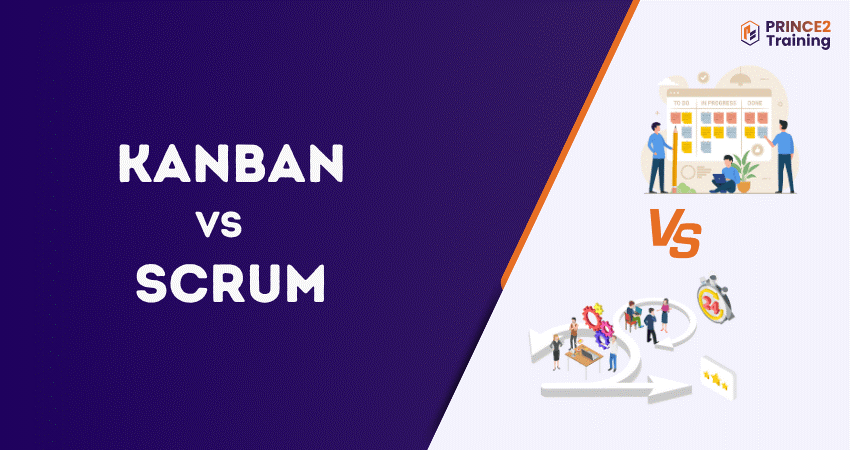
Have you been part of a project where tasks pile up, deadlines feel tight and the team struggles to stay coordinated? That is where Agile Project Management provides structure and clarity. Two widely used Agile approaches are Kanban and Scrum, both improving collaboration and helping teams deliver results more effectively. However, these methods operate differently, and choosing between them matters.
In this blog, you will learn what Kanban vs Scrum means, how they differ, and the roles, structure, and process followed in each method. So, if you want to decide which Agile approach aligns with your workflow, let’s begin!
Table of Contents
1) Kanban vs Scrum: What’s the Difference?
2) What is Kanban?
3) What is Scrum?
4) Kanban vs Scrum: 8 Key Differences
5) When to Use Kanban vs Scrum?
6) Pros and Cons of Using a Kanban Board
7) Pros and Cons of Using a Scrum Board
8) Kanban vs Scrum: Which Should I Use?
9) Conclusion
Kanban vs Scrum: What's the Difference?
Kanban and Scrum are both ways to manage work, but they are different. Kanban is flexible. It uses a board to show tasks moving through stages with no fixed roles or time limits. It's good for teams that need to change quickly.
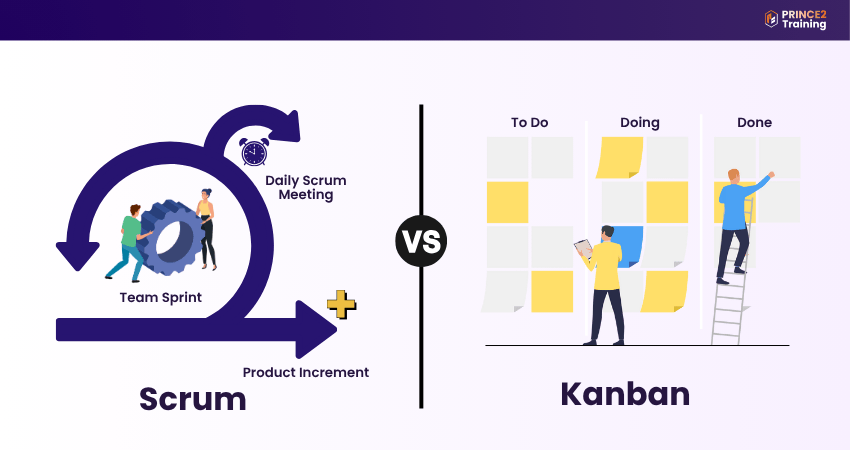
Scrum is more structured, with fixed roles and work completed in short timeframes called sprints (1–4 weeks). Teams plan, track, and review progress regularly. Scrum suits projects needing clear planning and frequent check-ins.

What is Kanban?
Kanban is a visual Project Management method that helps teams track work, improve flow, and enhance efficiency. It utilises a Kanban board, where work is shown in columns that represent different stages of the process. Each task sits on a card and moves across the board from “To Do” to “Done,” making progress visible and easy to monitor.
A major strength of Kanban is its transparency. Showing the entire workflow in a view helps teams identify slowdowns quickly and allocate effort accordingly. It uses Agile and Lean principles and blends well with other Project Management methods. For Kanban to work effectively, it follows a few important concepts:
1) Workflow Policies:
Explains the type of work that moves through the board, and how long tasks should take to be completed.
2) Work in Progress (WIP) Limits:
Teams place limits on active tasks to avoid overload and reduce bottlenecks.
3) Kaizen:
A mindset of continuous improvement where everyone looks for ways to refine the workflow for achieving better outcomes.
Kanban Roles
Kanban emphasises shared responsibility rather than fixed roles. There is no “Kanban Master”; instead, the team collectively updates the board, monitors progress, and resolves delays. An Agile Coach may assist, but everyone contributes to improving workflow and maintaining steady delivery.
What is Scrum?
Scrum is an Agile methodology built for managing complex projects where change is constant. It is designed around short, time-boxed cycles, known as sprints (1-4 weeks). Here, work is broken into smaller tasks for teams to deliver value systematically and adapt when priorities shift.
Scrum follows an iterative approach, meaning value is delivered in stages rather than at the very end of a project. Teams frequently release product increments, evaluate outcomes, and refine priorities based on feedback. Scrum is built on three fundamental pillars:
1) Transparency:
Everyone has a clear view of the progress made and present priorities.
2) Inspection:
This refers to the ongoing review to help identify issues proactively.
3) Adaptation:
Teams adjust their goals and priorities based on learnings and stakeholder input.
Scrum Roles
In Scrum, there are three well-defined roles to help teams stay focused and deliver value. It involves:
1) Product Owner:
Represents the customer and ensures teams work on priorities. They own and prioritise the backlog and communicate the product vision.
2) Scrum Master:
Acts as a servant-leader and facilitator, helping the team apply Scrum practices, remove blockers and maintain collaborative working.
3) Development Team:
Responsible for building and delivering product increments. They decide what can realistically be completed during each sprint and determine how to achieve it.
Although there are delegated responsibilities, no one manages the Scrum Team. The Scrum team are a self-organising unit where every member works to make decisions, improve processes, and ensure continuous delivery.
Learn to build high-quality software in Agile environments. Join our
Scrum Developer Training
now!
Kanban vs Scrum: 8 Key Differences
Kanban vs Scrum are two of the widely used Agile methods. Understanding their key differences will help you understand which to choose for your project needs. Let’s look at them below.
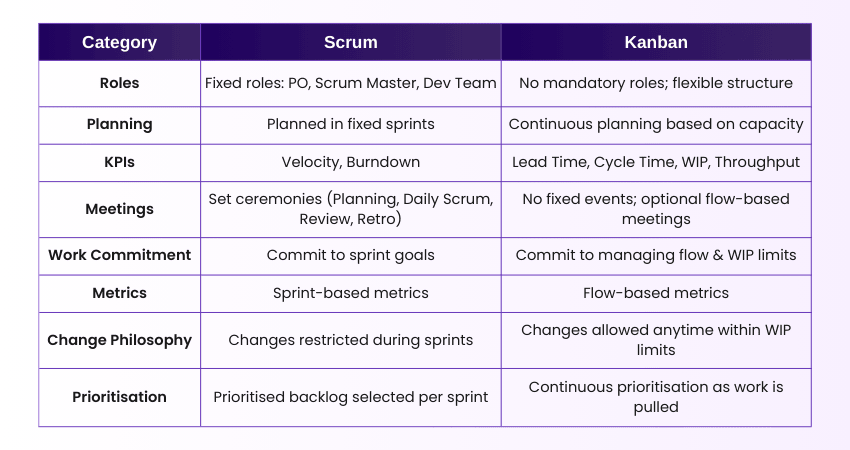
1) Kanban vs Scrum: Roles and Accountabilities
Kanban:
a) Kanban does not define roles; it can work with any existing organisational structure.
b) Teams may introduce roles such as Service Delivery Manager or Flow Manager, but they are optional.
c) Accountability is shared, with the whole team focusing on managing the flow of work.
d) Flexible for organisations that want to improve workflow without restructuring teams.
Scrum:
1) Scrum has three mandatory roles:
a) Product Owner (PO):
Maximises product value, manages backlog, sets priorities.
b) Scrum Master (SM):
Coaches the team, removes impediments, ensures adherence to Scrum rules.
c) Development Team:
Cross-functional members responsible for delivering increments.
2) Each role has a defined scope, ensuring clarity on who does what.
3) Creates a structured environment where accountability is tied to the Scrum framework.
2) Kanban vs Scrum: Planning
Kanban:
1) Uses continuous planning rather than fixed cycles.
2) Work items are pulled based on capacity, not time-boxes.
3) Ideal for teams with:
a) High variability in work
b) Frequent urgent requests
c) Continuous delivery environments
Scrum:
1) Operates on fixed-length Sprints (1–4 weeks).
2) Sprint Planning defines what the team will commit to achieving during the sprint.
3) Planning includes:
a) Selecting backlog items
b) Defining the sprint goal
c) Breaking work into tasks
4) Once a sprint starts, the plan is locked to prevent disruption.
Gain practical insights into Scrum principles and product strategy. Join our
Scrum Product Owner Certification
now!
3) Kanban vs Scrum: Essential Key Performance Indicators
Kanban KPIs:
1) Cycle Time:
Time taken for a single item to go from start to finish.
2) Lead Time:
Time from when a request is made to its delivery.
3) Work in Progress(WIP):
Measures how much work is currently being processed.
4) Throughput:
Number of completed items per time period.
Scrum KPIs:
1) Velocity: Measures how much work a team completes each sprint.
2) Burndown Charts: Tracks remaining work versus time.
3) Sprint Goal Success Rate: Shows how often teams deliver what they committed to.
4) Team Capacity: Indicates available effort for each sprint.
4) Kanban vs Scrum: Meetings and Events
Kanban:
Kanban does not prescribe events, but common meetings include:
1) Daily Stand-up:
Focuses on work items and flow rather than people.
2) Service Delivery Review:
Evaluates system performance and workflow.
3) Workflow Review:
Identifies bottlenecks and adjusts WIP limits.
4) Operations Review:
Looks at cross-team dependencies.
5) Risk Review and Strategy Meetings:
Helps align work with organisational goals.
Scrum:
1) Sprint Planning:
Sets the work for the next sprint.
2) Daily Scrum:
15-minute sync to discuss progress and obstacles.
3) Sprint Review:
Demonstration of completed work to stakeholders.
4) Sprint Retrospective:
Reflection on the process to improve next sprint.
5) Kanban vs Scrum: Work Commitment
Kanban:
1) Commitment happens at the work item level, not at sprint level.
2) Teams commit to respecting:
a) WIP limits.
b) Flow efficiency.
c) Pull policies.
3) No obligation to complete a fixed amount of work within a fixed time.
Scrum:
1) Teams commit to completing a defined set of work each sprint.
2) Commitment is linked to the Sprint Goal.
3) Helps build predictability and trust with stakeholders.
6) Kanban vs Scrum: Metrics
Kanban Metrics:
1) Control charts for cycle time stability.
2) Cumulative Flow Diagram (CFD) for analysing bottlenecks.
3) Metrics reflect the health of the workflow.
Scrum Metrics:
1) Burndown/Burnup charts to track sprint progress.
2) Velocity for estimating future work.
3) Focuses on predictability within time-boxed iterations.
7) Kanban vs Scrum: Change Philosophy
Kanban:
1) Welcomes changes at any time.
2) New items can enter the board as long as they don’t break WIP limits.
3) Highly adaptive to dynamic environments.
Scrum:
1) Minimises changes during a sprint.
2) Helps maintain focus and reduces thrashing.
3) New work requests typically wait until the next sprint.
8) Kanban vs Scrum: Prioritisation
Kanban:
1) Prioritisation is continuous and dynamic.
2) When team capacity frees up, they pull the highest-value item from the top of the queue.
3) Allows fast response to new priorities.
Scrum:
1) The Product Owner maintains a prioritised Product Backlog.
2) During Sprint Planning, the top items are chosen based on:
a) Value
b) Risk
c) Dependencies
d) Team capacity
3) Prioritisation affects sprint outcomes.
When to Use Kanban vs Scrum?
Choosing between Kanban and Scrum depends on your team’s workflow, project type, and need for structure or flexibility.
Use Kanban When:
1) Your work is continuous, like support or maintenance
2) You need flexibility to handle changing priorities
3) Team roles are informal or overlapping
4) You want to start Agile without big process changes
5) You aim to improve flow efficiency over time
Use Scrum When:
1) Your project benefits from fixed-length sprints
2) You need clearly defined roles and responsibilities
3) Progress needs regular review and adaptation
4) Your team works best with time-boxed goals
5) Delivering incremental value at set intervals is important
Both methods can be powerful; choose the one that best fits your team’s style and project demands.
Build essential Project Management skills by learning agile the smart way with
Agile Project Management Foundation (AgilePM® V3) Course
now!
Pros and Cons of Using a Kanban Board
Kanban is great for ongoing projects and gives a clear view of tasks. But, like any method, it has both good and bad points. Here’s a quick look at the pros and cons:

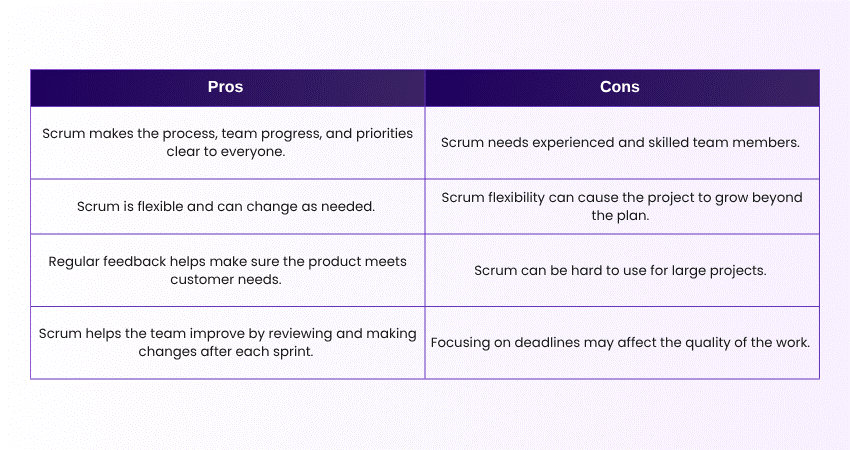
Pros and Cons of Using a Scrum Board
The Scrum framework is a popular way to manage projects, with both benefits and challenges. Let’s look at some key pros and cons of using Scrum:
Kanban vs Scrum: Which Should I Choose?
Choosing between Kanban vs Scrum depends on your team’s needs, workflow style, and project complexity. Scrum is ideal for teams that thrive in structure, working in time-boxed sprints with defined roles and regular ceremonies. Kanban, on the other hand, offers greater flexibility, continuous delivery, and visual tracking, perfect for teams needing adaptability and ongoing work.
Both methods increase productivity and visibility, but in different ways. Understanding your team’s priorities and how work flows through your system will help you choose the most suitable framework. You may even combine aspects of both approaches to benefit from structure while maintaining adaptability.
Conclusion
Choosing between Kanban vs Scrum depends on your team's needs. Kanban is ideal for continuous work with flexibility, while Scrum is better for teams that need structure and clear timelines. Both methods have unique strengths, so consider your project's requirements and your team's working style to select the most effective approach for a smooth workflow and successful delivery.
Gain expertise in Scrum and drive team success with our Scrum Master Training – Join now!
Frequently Asked Questions?
Kanban is a visual Project Management approach used in Agile to manage tasks, visualise workflows, and improve the efficiency of teams. It helps manage work continuously and is highly flexible.
Jira is a Project Management tool that supports both Scrum and Kanban. Teams can use it for Scrum sprints, Kanban boards, or even a combination of both.
The four common metrics in Kanban are:
1) Lead Time: Time taken from start to finish
2) Cycle Time: The time a task spends in a specific stage
3) Throughput: Number of tasks completed at each time
4) Work In Progress (WIP): The number of tasks in the “In Progress” stage