

 Back
Back


 Back to
topics
Back to
topics



Table of Contents
 21-Mar-2026
Author-Kanban Board Explained
Managing tasks across a project can become confusing when work piles up, priorities shift and teams lose track of progress. This is where a Kanban Board becomes incredibly useful. It helps teams organise tasks visually, making it easier to see what needs to be done, what is currently in progress, and what has already been completed.
By presenting work in clear stages, it simplifies how teams track and manage their work. It improves transparency, encourages better collaboration and helps identify bottlenecks before they slow down progress. In this blog, you will learn about what is a Kanban Board, how it works, its components, benefits, and more.
What is a Kanban Board?
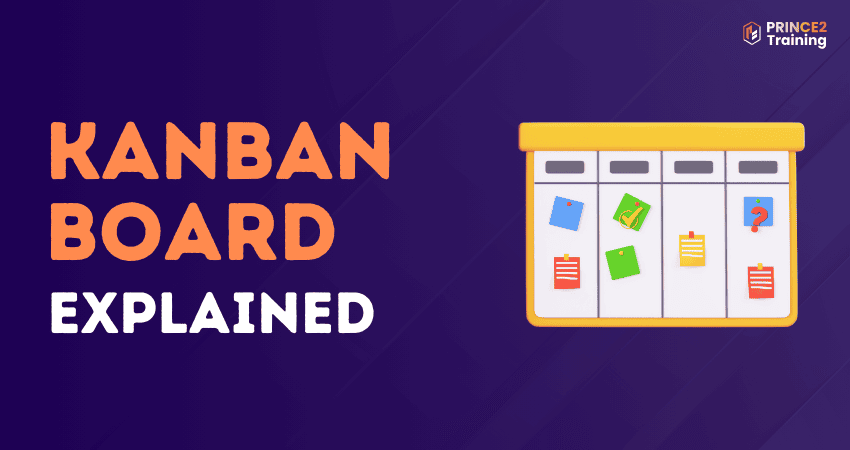
A Kanban Board is a visual tool that helps teams track work and understand the status of tasks. It organises tasks into columns that show different stages of work, giving teams a clear overview and making communication easier.
It is also a core part of the Kanban method, which focuses on improving workflow and continuously optimising business processes. By visualising work, a Kanban Board helps teams increase productivity and reduce confusion in Task Management.
How Does a Kanban Board Work?
A Kanban Board works by representing tasks as cards placed in columns on a board. Each column reflects a stage in the workflow, such as To Do, In Progress, or Done, showing the sequence of steps a task follows from start to completion. Team members create cards for individual tasks and place them in the appropriate column to show their work status.
As work progresses, team members move the cards from one column to the next. Different card colours can represent various types of tasks, while horizontal rows called swimlanes organise work by team, priority, or project. Also, some columns have limits on the number of tasks they can hold to maintain a smooth workflow and prevent work overload.
Components of a Kanban Board
A Kanban Board consists of several components that help teams visualise tasks, manage workflow, and improve productivity. These components organise work clearly and allow teams to track progress from the start of a task to its completion. Let's look at some of them below:
1) Visual Signals: Visual signals are the cards used to represent work items on the board. Each card represents one task, project, or user story. These cards help team members quickly understand what work is currently being handled.
2) Columns: Columns represent different stages of the workflow. Common examples include To Do, In Progress, and Done. As tasks progress, cards move across these columns from left to right until completion.
3) Work-in-Progress (WIP) Limits: WIP limits control the maximum number of tasks allowed in a particular column at one time. These limits prevent teams from taking on too many tasks simultaneously and help identify workflow bottlenecks.
4) Commitment Point: The commitment point marks the stage where a task moves from the backlog into active work. It indicates that the team has agreed to start working on that task.
5) Delivery Point:
It is the final stage of the workflow where the task is completed and delivered to the customer or stakeholder. The time taken from the commitment point to the delivery point is known as lead time.
How to Create a Kanban Board?
Creating a Kanban Board is a simple way to organise tasks, visualise workflow, and improve team productivity. Let’s look at the steps below:
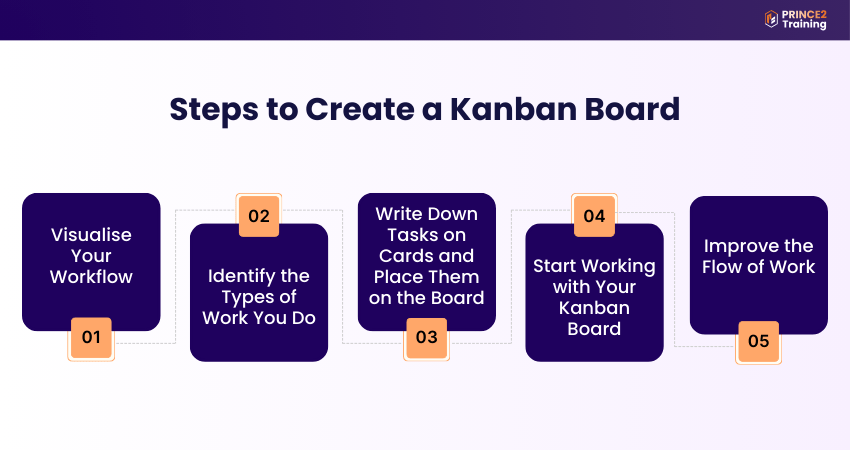
Step 1: Visualise Your Workflow
Begin by identifying the steps involved in completing your work. Draw columns on a whiteboard or digital board to represent each stage of the workflow, such as To Do, In Progress, and Done. These columns help teams understand how tasks move through the process from start to finish.
Step 2: Identify the Types of Work You Do
Now, decide on the types of tasks your team handles, such as customer requests, support tickets, development tasks, or maintenance work. Assign different colours or labels to each type of task so they can be easily recognised and organised on the board.
Step 3: Write Down Tasks on Cards and Place Them on the Board
Then, write each task on a separate card or sticky note and place it in the relevant column based on its current stage. Arrange cards based on priority, placing the most important tasks at the top so the team knows what to focus on first.
Step 4: Start Working with Your Kanban Board
This brings us to the step where team members begin working on tasks from the top of the column. As work progresses, the cards are moved from one column to the next. This movement clearly shows the status of each task and helps everyone stay updated on work progress.
Step 5: Improve the Flow of Work
Lastly, review the board regularly to identify delays, bottlenecks, or overloaded stages. Limiting the number of tasks in certain columns can help maintain a steady workflow and ensure the team focuses on completing tasks before starting new ones.
Learn the core Agile principles to manage projects with flexibility and control by joining the
Agile Project Management Foundation (AgilePM® V3) Training
now!
Types and Examples of Kanban Boards
Kanban can be adapted to many environments, including manufacturing, human resources, Agile teams, and DevOps software development. Here, let’s look at the common and widely used Kanban Boards below:
1) Digital Kanban Boards
A digital Kanban Board is an online version of the traditional board that helps teams manage tasks through digital tools. Platforms, such as Trello or Jira, allow teams to create columns representing workflow stages and organise tasks as cards.
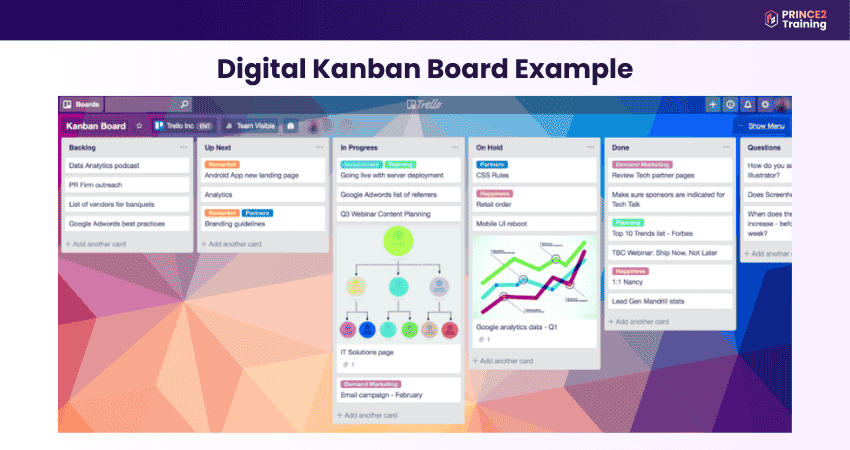
As work progresses, these cards move across the digital columns, making it easy to track updates and manage tasks remotely. Digital boards are useful for distributed teams because they allow real-time collaboration, easy updates, and better tracking of project progress.
2) Physical Kanban Boards
A physical Kanban Board is a simple board divided into columns that represent different stages of work, such as To Do, In Progress, and Done. Tasks are written on sticky notes and placed in the relevant column, allowing teams to easily see the status of work.
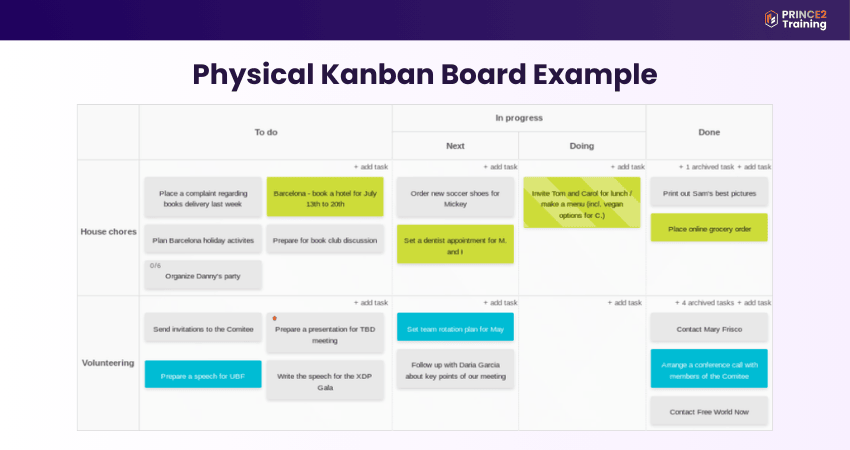
As tasks move through the workflow, the sticky notes are moved across the board from left to right. Physical boards are easy to set up and are always visible, which helps teams working in the same location quickly understand progress and communicate about tasks.
Advance your Agile skills to confidently lead and deliver complex projects with the
Agile Project Management Practitioner (AgilePM® V3) Course
– Sign up now!
Benefits of Using Kanban Board
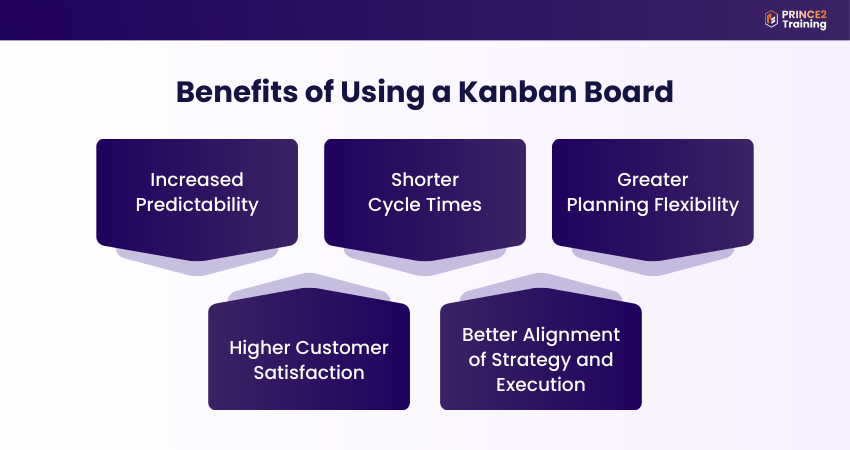
Utilising a Kanban Board provides several advantages for teams across various industries. By visualising tasks and workflow, teams can manage work more effectively and improve overall productivity. Let's look at the key benefits below:
1) Increased Predictability
Regularly reviewing progress on a Kanban Board helps teams estimate how long tasks or projects will take. This improves planning, resource allocation, and overall predictability in project delivery.
2) Shorter Cycle Times
A Kanban Board helps teams complete tasks faster by making the workflow visible and easier to manage. By tracking the time taken for tasks to move from start to completion, teams can identify delays and resolve bottlenecks quickly and proactively.
3) Greater Planning Flexibility
A Kanban Board allows teams to prioritise tasks again whenever necessary. New tasks can be added or moved based on changing business needs. This helps teams respond quickly without disrupting the workflow.
4) Higher Customer Satisfaction
By managing tasks more efficiently and ensuring quality checks at different stages, teams can deliver work faster with better quality. This leads to improved products, services, and overall customer satisfaction.
5) Better Alignment of Strategy and Execution
Usually, tasks added to a Kanban Board are prioritised based on organisational goals. This ensures that teams focus on the most important and strategic tasks first. This helps teams to align daily work with overall business objectives.
Learn the fundamentals of PRINCE2 Agile® to manage Agile projects confidently with
PRINCE2 Agile® Foundation Training
– Sign up now!
Kanban vs Scrum Board
Both Kanban Boards and Scrum Boards are visual tools used to organise tasks and track progress. However, they support different approaches to managing work, and understanding their differences helps teams choose the method that best suits their workflow. Let’s look at their differences below:
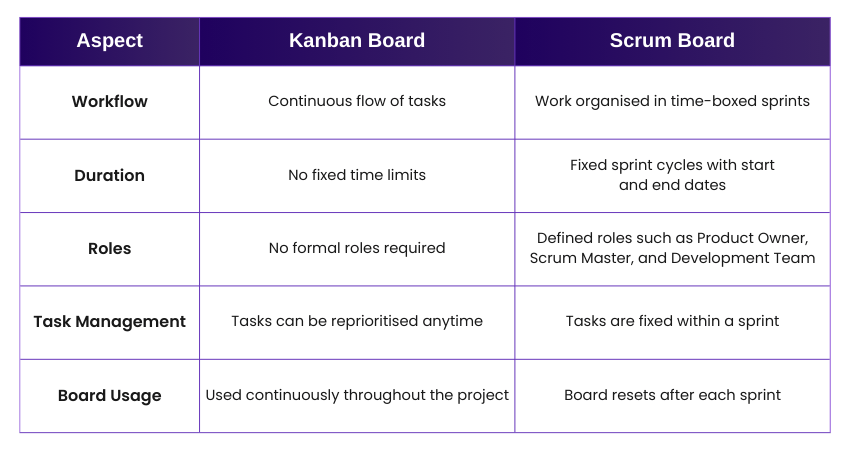
Scrum Boards are designed for teams working in sprints, where tasks are planned and completed within a fixed time. Once the sprint ends, the board is cleared and prepared for the next cycle. In contrast, a Kanban Board supports a continuous workflow which allows tasks to move through different stages without fixed deadlines.
Scrum follows a structured framework with defined roles such as Product Owner and Scrum Master, along with a set number of tasks to be completed within a sprint. However, Kanban does not require specific roles and allows teams to add tasks or reassign work at any time. This makes it more flexible for managing ongoing work.
Kanban Board Best Practices
A Kanban Board is simple to use, but following effective practices helps teams bring out the full benefits of this workflow system. By applying these practices, teams can improve transparency, manage workloads better, and ensure tasks move smoothly. Let’s look at them below:
1) Visualise the Entire Workflow:
Ensure the Kanban Board reflects the full workflow, from the moment a task is created to its final completion. Each stage of the process should have a dedicated column so teams can clearly see how work progresses.
2) Limit Work-in-Progress (WIP):
Set limits on the number of tasks allowed in each stage of the workflow. WIP limits help prevent teams from work overload and encourage them to complete existing work before starting new tasks.
3) Manage and Monitor Workflow Regularly:
Observe how tasks move across the board. Monitoring the flow helps teams identify bottlenecks, delays, or overloaded stages and take action to improve efficiency.
4) Make Processes and Policies Clear:
Define clear guidelines on how the Kanban Board should be used. Team members should understand what each column represents, when to move tasks, and how to mark blocked or high-priority items.
5) Use Visual Signals:
Use colours, labels, or symbols on cards to provide additional information about tasks. Visual signals can indicate priority, task type, responsibility, or deadlines, helping teams quickly understand task details.
6) Encourage Feedback and Continuous Improvement:
Review the Kanban Board regularly with the team to discuss progress and identify improvements. Feedback helps teams refine their workflow and continuously enhance productivity.
7) Keep the Board Updated:
Update the Kanban Board whenever the status of a task changes. A regularly updated board ensures that it remains an accurate reflection of the team’s work and progress.
8) Encourage Collaboration and Communication:
A Kanban Board should support open communication among team members. Making work visible encourages discussions, problem-solving, and better coordination across the team.
Conclusion
A Kanban Board is a simple and powerful visual tool that helps teams organise tasks, visualise workflow, and improve efficiency. By making work visible and managing tasks through clear stages, teams can collaborate better, reduce bottlenecks, and deliver results smoothly. It not only improves Task Management but also supports continuous improvement, leading to better project outcomes.
Build effective Agile project skills to deliver projects faster, smarter, and more efficiently with Agile Project Management Training – Sign up today!
Frequently Asked Questions?
The six rules of Kanban include:
1) Visualise Workflow: Show the tasks and stages clearly
2) Limit WIP: Restrict tasks in each stage
3) Manage Flow: Ensure the task moves smoothly
4) Make Policies Explicit: Define clear workflow rules
5) Implement Feedback Loops: Review progress regularly
6) Improve Collaboratively: Continuously refine the processes
The four principles of Kanban include:
1) Start with What You Do Now: Apply Kanban to existing workflows
2) Pursue Incremental Change: Improve processes gradually through small steps
3) Respect Current Roles: Value existing responsibilities and processes
4) Encourage Leadership: Support improvement ideas from everyone
The drawbacks of Kanban include:
1) Lack of Structure: No defined roles cause confusion
2) Poor Predictability: Harder to estimate long-term deadlines
3) Team Discipline Needed: Ignoring WIP limits causes bottlenecks
4) Outdated Boards: Unupdated boards show inaccurate progress
5) Complex Project Challenges: Less suitable for large projects