

 Back
Back


 Back to
topics
Back to
topics



Table of Contents
 28-Feb-2026
Author-Veronica Davis
Technology plays a highly important role in running everything today, from the applications we use daily to the systems organisations rely on. However, every successful digital solution is built on careful planning and coordination. That is where IT Project Management plays a crucial role, helping teams turn complex ideas into reliable technology that delivers real value.
It brings clarity, control, and accountability at every stage of a technology initiative. Delayed software launches and system failures often result from poor planning and unclear direction. IT Project Management provides the structure needed to prevent these problems. In this blog, you will learn about what is IT Project Management, its five phases, types and more to help you navigate projects smoothly.
What is IT Project Management?
IT Project Management is the process of planning, organising, and overseeing the information technology projects to ensure successful project completion. It involves managing tasks, timelines, resources, and risks to deliver technology-based solutions. These projects exist across various areas, such as software development, information security, networks, databases, mobile applications, communications, hardware and more.

What are the Five Phases of IT Project Management?
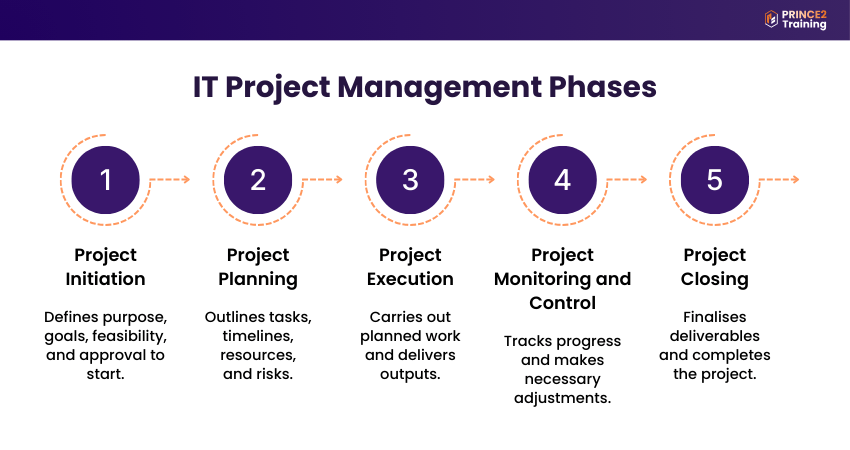
IT Project Management follows a structure that helps projects navigate from their idea to completion. Each phase plays an important role in ensuring projects are properly planned, executed efficiently, and delivered successfully. Let’s look at them below:
1) Initiation
Initiation is the beginning of a project. Here, teams identify the project need, define objectives, and assess its feasibility. Stakeholders review and approve the project proposal to confirm that it is practical and worth pursuing before moving forward.
2) Planning
In the planning phase, teams create a detailed plan for the project. They break down tasks, set timelines, allocate resources, estimate budgets, and define communication methods. Here, tools such as work breakdown structures and project roadmaps help organise complex work and guide the entire project.
3) Execution
During the execution phase, the planned work is executed. Here, teams develop solutions, implement systems, and test functionality. Collaboration and communication are essential to ensure tasks are completed correctly and challenges are addressed proactively.
4) Monitoring and Control
When work is being continued, progress is tracked continuously against the developed project plan. Here, teams monitor time, cost, scope, and quality, adjusting where needed. This phase ensures the project stays aligned with its objectives and does not drift from its set scope.
5) Closure
Closure is the final phase where the project is completed and delivered. Here, teams finalise outputs, evaluate performance, document lessons learned, and close the project. Reviewing results helps organisations improve future projects and maintain continuous improvement.
Understand the framework behind successful projects with
PRINCE2® Foundation Training
now!
What Does an IT Project Manager Do?
An IT Project Manager is primarily responsible for planning, coordinating, and overseeing technology-based projects from initiation through to completion. They ensure projects are delivered on time and within budget. Let’s look at their core responsibilities below:
1) Communicates Across Teams and Departments: They work closely with IT teams and coordinate with other departments to ensure everyone is aligned, communication is clear, and collaboration is seamless throughout the project.
2) Ensures Product Functions Properly: They oversee development and delivery to ensure the solution meets customer requirements, performs reliably, and resolves issues proactively if problems arise.
3) Assigns Tasks to Team Members: They define roles and responsibilities by understanding team capabilities and allocating work effectively to ensure productivity and accountability are maintained.
4) Tracks Progress and Performance: They monitor timelines, budgets, and team output, using tools and reports to measure performance and keep the project aligned with organisational goals.
5) Lead Agile Meetings and Engage Stakeholders: They conduct regular meetings, share status updates, manage expectations, and ensure stakeholders remain informed and involved in key decisions.
Types of IT Project Management Tools
IT Project Management tools help teams stay organised, clarify responsibilities, and monitor progress for the entire project lifecycle. Let's look at the common types of tools below:
1) Responsibility Management Tool
This tool defines who is responsible for each task and who needs to be involved. They help avoid confusion, improve accountability, and ensure clear communication across the project.
Example: Responsible, Accountable, Consulted, and Informed (RACI) Chart
RACI Chart
A RACI Chart is a responsibility assignment tool that clearly defines who is Responsible, Accountable, Consulted, and Informed for each task or deliverable. It removes confusion around roles, improves accountability, and ensures stakeholders know their level of involvement. This tool is useful in all IT projects where clear ownership and communication are essential.
2) Timeline and Dependency Visualisation Tool
This tool helps plan project timelines, set deadlines, and manage task dependencies. They allow teams to see how work is structured and ensure activities are completed in the right sequence.
Example: Gantt Chart
Gantt Chart
A Gantt Chart is a timeline visualisation tool that displays project tasks as horizontal bars along with a schedule. It shows task duration, sequencing, and dependencies, helping teams understand how activities connect and overlap with each other. This tool is valuable for projects with multiple dependent tasks, as it helps manage deadlines and track overall progress.
3) Workflow and Task Tracking Tool
This tool tracks the progress of tasks as they move through different stages of the project lifecycle. They help teams manage workload, monitor existing work, and maintain steady progress.
Example: Kanban Boards
Kanban Boards
Kanban Boards is a workflow management tool that displays tasks based on their stage, such as to do, in progress, and completed. They help teams manage workload, visualise task flow, and monitor progress. This tool is suitable for projects that involve continuous updates or incremental changes, enabling teams to adjust work efficiently and maintain balance.
Turn knowledge into confident project leadership wcccith
PRINCE2® Practitioner Training
today!
Common Challenges in IT Project Management
IT Project Management can be complex due to the technical demands that come with it. Let’s look at the common challenges to help teams respond effectively:
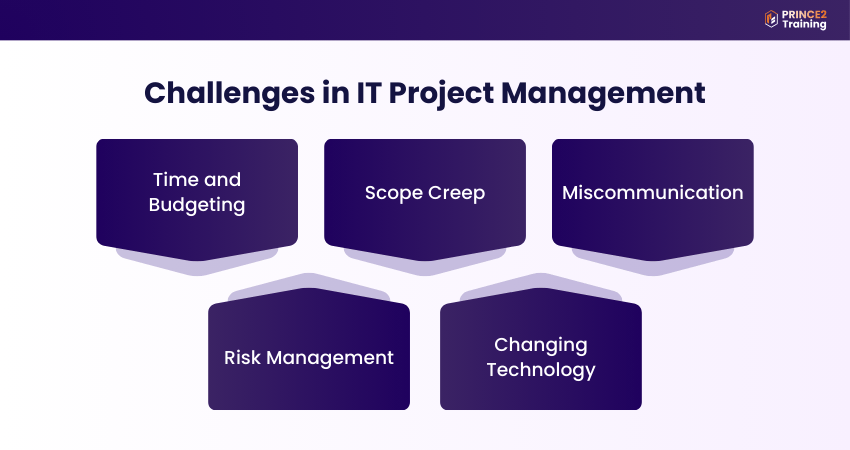
1) Time and Budgeting
Managing deadlines and budgets is one of the major challenges in IT Project Management. Due to unrealistic timelines or limited resources, quality is compromised and pressure increases for teams. For this, planning based on priority helps prevent delays and cost overruns. Let's look at the example below:
Situation: Senior management asks your team to complete a company-wide software migration within a month, but your team lacks the size and experience to finish it in that timeframe.
Solution: Use Project Management tools to clearly show team capacity and workload, helping management set realistic deadlines based on available resources.
2) Scope Creep
Scope Creep arises when new requirements are added after the project begins, expanding the original objectives. This can lead to disruption of schedules, increasing costs, and complicating delivery if it is not properly controlled. Let’s look at the example below:
Situation: A project to improve outdoor Wi-Fi coverage at headquarters expands when stakeholders request coverage for another building and additional features beyond the original plan.
Solution: Set clear project objectives from the beginning and use a formal change control process to evaluate and manage any new requests.
3) Miscommunication
Since IT Project Managers coordinate multiple teams and stakeholders, poor communication can lead to misunderstandings and incorrect expectations. This is why clear and consistent communication is essential for ensuring project success. Let's look at the example below:
Situation: A project involves installing Wi-Fi and donating 100 computers to a school, but senior management believes only 10 computers will be provided.
Solution: Share regular status updates and maintain clear communication channels so all stakeholders stay informed throughout the project.
4) Risk Management
IT Project Management often involves technical uncertainties, making Risk Management essential from the beginning. Without planning for potential issues, teams may struggle to respond effectively when problems occur. Let’s look at the example below:
Situation: A hospital scheduling system is launched, but a software bug causes patients to be assigned to the wrong departments.
Solution: Implement risk assessment and contingency planning early. Use tools, such as risk registers, to identify, monitor, and respond to potential issues proactively.
5) Changing Technology
As technology keeps evolving rapidly, long-term IT projects may face shifting customer needs or emerging innovations. For this, projects must remain flexible to adapt to these changes effectively. Let’s look at the example below:
Situation: While improving a car GPS system, new mobile apps with real-time traffic features become widely available. This makes the original system less competitive.
Solution: Assess whether adapting the project by including new features aligns with business goals and adjust the project plan if required.
Step into modern hybrid Project Management confidently with
PRINCE2 Agile® Foundation Training
– Join now!
IT Project Management Best Practices
Implementing the best practices in IT Project Management helps teams deliver projects efficiently, reduce risks, and achieve better business outcomes. Let's look at some practical and effective practices below:
1) Clearly Define the Project Scope: Set clear project objectives, boundaries, and deliverables, ensuring everyone understands what is included and what is not. This prevents scope creep and keeps the project concentrated on the specific tasks.
2) Plan Effectively: Create a detailed plan that outlines tasks, timelines, resources, and responsibilities. With strong planning, a clear roadmap guides the team to execute work in an organised and structured manner.
3) Engage With Stakeholders: Always maintain regular communication with stakeholders to keep them informed, collect feedback, and ensure alignment with their expectations. Engaging them early helps to identify potential issues and bottlenecks before they escalate.
4) Identify and Manage Risks Proactively: Recognise potential risks early and prepare mitigation strategies to reduce their impact. Proactive Risk Management helps teams respond proactively to challenges and maintain steady project progress.
Conclusion
IT Project Management plays an important role in turning complex technology into successful business solutions. From planning and execution to managing risks and solving issues, a structured approach ensures projects stay on track and deliver real value. Applying the right tools, best practices, and clear communication improves project outcomes and helps teams adapt, innovate, and stay competitive.
Build globally recognised Project Management expertise with
PRINCE2® Certification
today!
Frequently Asked Questions?
IT Project Management methodologies are structured frameworks that help in planning, executing, and controlling projects to ensure efficiency and quality. Some common methodologies include:
1) Agile Methodology
2) Waterfall Methodology
3) Scrum Methodology
4) Kanban Methodology
5) Lean Methodology
IT Project Managers need a combination of technical expertise, leadership, and management knowledge. They must know how to coordinate with teams, manage risks, communicate effectively, and make strategic decisions with strong business awareness.
A Project Manager focuses on delivering specific, time-bound initiatives with defined goals, budgets, and timelines. In contrast, an IT Manager oversees the ongoing operation of technology systems, infrastructure, and teams.